
Introduction
VR Gaming has rapidly become one of the most exciting trends in the world of entertainment. Over the past few years, virtual reality (VR) has transformed from a niche technology into a mainstream experience, captivating both beginners and experienced gamers. The primary attraction of VR gaming lies in its ability to immerse players into a fully interactive, 3D world, where they are not just controlling characters on a screen but actually feel like they are inside the game itself.
For beginners, stepping into VR gaming can feel overwhelming at first. The range of headsets, motion controllers, and game genres can be confusing. However, with the right guidance, VR gaming can be an enjoyable and rewarding experience. It combines elements of traditional video games with cutting-edge technology, creating experiences that are not possible in regular gaming setups.
What is VR Gaming?
VR Gaming, short for Virtual Reality Gaming, is a form of interactive entertainment that uses VR technology to create a fully immersive gaming experience. Unlike traditional gaming, where you control characters using a keyboard, controller, or touch screen, VR gaming places you directly in a 3D environment.
Players wear a VR headset, which provides a stereoscopic display, showing slightly different images to each eye to create a sense of depth. Many VR systems also include motion controllers or haptic feedback gloves, allowing users to interact with the virtual world by moving their hands, body, or head.
There are various types of VR games, including:
- Action Games: Fast-paced experiences requiring reflexes and coordination.
- Simulation Games: Realistic experiences like flying planes or driving cars.
- Adventure Games: Story-driven games that immerse players in a virtual world.
- Puzzle and Strategy Games: Games that challenge your mind in an interactive 3D space.
VR gaming is compatible with several platforms, including PC, gaming consoles, and standalone VR devices, giving players multiple options depending on their preferences and budgets.
Why is VR Gaming Important?
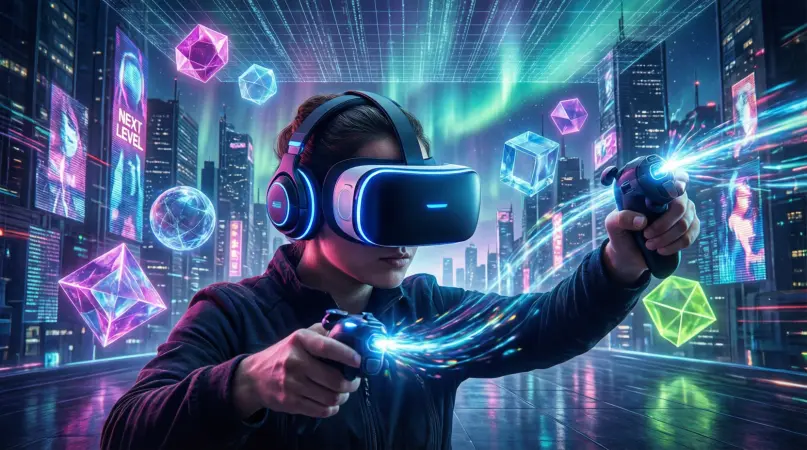
VR Gaming is more than just a fun activity; it is an important evolution in the gaming industry. Here’s why:
- Immersive Experience: VR gaming allows players to feel like they are part of the game, enhancing engagement and realism.
- Interactive Learning: Many VR games incorporate educational elements, helping players learn new skills or concepts while playing.
- Physical Activity: VR gaming often requires movement, which can improve fitness and reduce sedentary behavior.
- Innovation in Technology: VR pushes the boundaries of gaming technology, inspiring advancements in graphics, AI, and motion tracking.
- Mental Health Benefits: Playing VR games can reduce stress and provide a sense of escapism from daily life challenges.
In essence, VR gaming represents the future of interactive entertainment by combining technology, creativity, and human engagement in ways that traditional gaming cannot.
Detailed Step-by-Step Guide to VR Gaming
Step 1: Choose the Right VR Headset
Selecting the right VR headset is crucial. There are three main types:
- PC VR Headsets: Offer the highest quality graphics but require a powerful computer (e.g., Valve Index, HTC Vive).
- Console VR Headsets: Designed for gaming consoles like PlayStation VR.
- Standalone VR Headsets: All-in-one devices with no need for a PC or console (e.g., Meta Quest 3).
Consider comfort, resolution, field of view, and tracking accuracy when choosing a headset.
Step 2: Set Up Your VR Space
You need a safe space to play VR games:
- Clear an area free of obstacles.
- Ensure adequate lighting for tracking sensors.
- Use VR mats or floor markers to prevent accidents.
Step 3: Install VR Software
- Install the necessary VR platform software (SteamVR, Oculus app, or console-specific software).
- Create an account and ensure your system is updated.
Step 4: Learn the Controls
- Most VR games use motion controllers.
- Practice grabbing, pointing, and interacting with objects in tutorial games.
- Learn how to move in-game: teleportation or smooth locomotion.
Step 5: Start With Beginner-Friendly Games
- Choose simple VR games to get accustomed to the environment.
- Examples: Beat Saber, Job Simulator, Moss.
- Gradually move to more complex or physically demanding games.
Step 6: Adjust Settings for Comfort
- Reduce motion sickness by adjusting movement settings.
- Customize graphics, height, and controller sensitivity.
- Take regular breaks to prevent eye strain and fatigue.
Step 7: Explore Advanced Features
- Try multiplayer VR games to interact with others.
- Use haptic feedback devices for a more realistic experience.
- Explore VR mods or custom worlds for added variety.
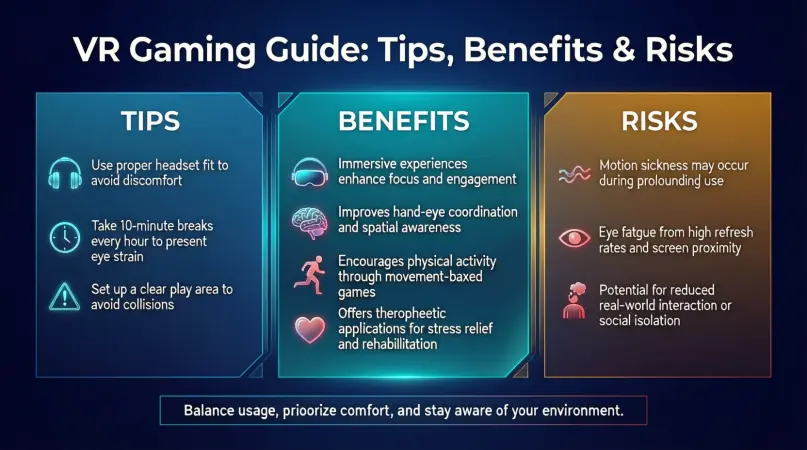
Benefits of VR Gaming
- Immersive Entertainment: Feel like you’re inside the game world.
- Enhanced Learning: Educational VR games improve retention and understanding.
- Physical Exercise: Active VR games promote movement and fitness.
- Stress Relief: VR experiences can reduce anxiety and improve mood.
- Social Interaction: Multiplayer VR games foster teamwork and communication.
- Innovation: Stay at the forefront of technology and gaming trends.
Disadvantages / Risks
- Motion Sickness: Rapid movements can cause nausea in some players.
- High Cost: Quality VR systems can be expensive.
- Physical Injuries: Risk of bumping into objects or straining muscles.
- Limited Game Library: Not all games are VR-compatible.
- Eye Strain: Prolonged use may cause discomfort or headaches.
- Isolation: Excessive VR gaming may reduce real-world social interactions.
Common Mistakes to Avoid
- Skipping Tutorials: Learning VR controls is essential for a safe and enjoyable experience.
- Ignoring Space Requirements: Playing in a cluttered area increases the risk of accidents.
- Overuse: Extended sessions can lead to fatigue or motion sickness.
- Incorrect Calibration: Not adjusting headset settings may ruin immersion and cause discomfort.
- Neglecting Updates: Outdated software can cause glitches or compatibility issues.
- Buying Based on Price Alone: Cheaper headsets may compromise quality and experience.
FAQs About VR Gaming
1. Is VR gaming suitable for children?
Yes, but it’s recommended for ages 12+ due to headset size, content, and potential eye strain. Parental supervision is advised.
2. Can I get motion sickness from VR gaming?
Some players may experience nausea, especially in fast-paced games. Using teleportation movement and taking breaks can reduce it.
3. Do I need a powerful computer for VR gaming?
PC VR headsets require high-performance computers. Standalone headsets do not need a PC.
4. How long should I play VR at a time?
Start with 20–30 minute sessions. Gradually increase as your tolerance improves. Always take breaks.
5. Can VR gaming improve fitness?
Yes, active VR games involve physical movement, improving coordination, endurance, and even calorie burn.
6. Are all video games compatible with VR?
No. Only games specifically designed or adapted for VR can be played. Check compatibility before purchasing.
7. Is VR gaming expensive?
VR can be costly, but there are budget-friendly options. Standalone headsets are usually cheaper than PC-based systems.
8. Can I play multiplayer VR games?
Yes. Many VR games support multiplayer modes, allowing you to interact with friends and online players.
Expert Tips & Bonus Points
- Start Slowly: Don’t rush into complex VR games. Build tolerance to motion and immersion.
- Use Anti-Fog Sprays: Keep your headset lenses clear during long sessions.
- Maintain Headset Hygiene: Regularly clean face padding and lenses to avoid irritation.
- Optimize Play Area: Ensure safe, spacious, and well-lit environment.
- Explore VR Communities: Join forums or social media groups for game recommendations and tips.
- Customize Controls: Adjust button mappings for comfort and efficiency.
- Try Mixed Reality Experiences: Combine VR with real-world objects for enhanced gameplay.
Conclusion
VR gaming is an incredible way to experience games in a completely new dimension. It immerses players into interactive 3D worlds, offering entertainment, fitness, learning, and social engagement all in one. While there are some risks like motion sickness, eye strain, and high costs, these can be managed with proper guidance, breaks, and equipment selection.
For beginners, understanding the basics, setting up a safe play space, and starting with simple games is key to enjoying VR. For intermediate users, exploring advanced controls, multiplayer modes, and haptic devices can elevate the experience even further.