
Introduction
Augmented Reality Integration is no longer a concept of the future; it is becoming a part of everyday life. From mobile apps and e-commerce websites to educational tools and healthcare solutions, AR is changing how people interact with digital content. Simply put, augmented reality (AR) overlays digital objects, information, or visuals onto the real world, creating an interactive and immersive experience.
Businesses and developers are increasingly adopting AR to engage users, improve customer experience, and streamline operations. The integration of AR into existing systems, apps, and platforms allows users to visualize products, access information instantly, and interact with their surroundings in new ways. Unlike virtual reality, which requires complete immersion into a digital environment, AR enhances the real world without replacing it.
What is Augmented Reality Integration?
Augmented Reality Integration is the process of incorporating AR technology into existing software, applications, or systems. It allows digital elements such as images, videos, 3D models, and text to overlay the real world, creating a blended interactive experience. Unlike traditional apps that display content on a flat screen, AR applications respond to a user’s environment in real time.
For example, in retail, AR integration allows customers to try on clothes virtually or visualize furniture in their home before making a purchase. In education, AR can bring textbooks to life, allowing students to interact with 3D models of planets, human anatomy, or historical artifacts. In manufacturing and healthcare, AR integration assists in training, maintenance, and surgical procedures by providing real-time guidance.
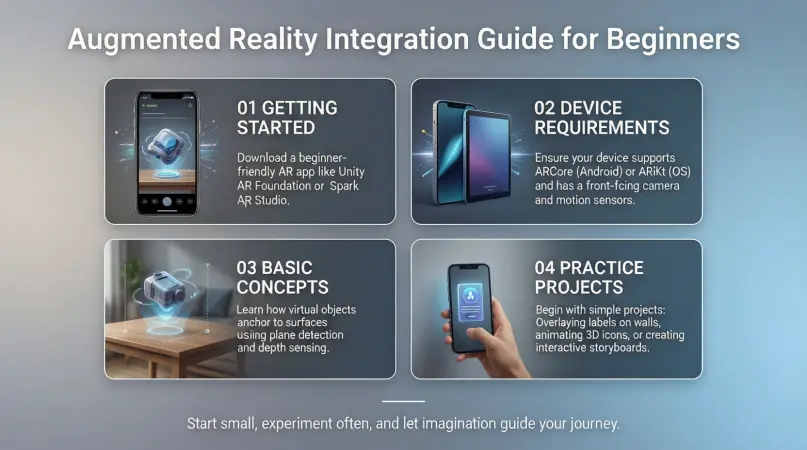
The technology relies on various tools and frameworks, including ARKit for iOS, ARCore for Android, and other cross-platform AR development tools. Sensors, cameras, and motion tracking play a crucial role in detecting the physical environment, ensuring that digital elements align correctly with real-world objects.
By integrating AR, businesses and developers create richer, more engaging experiences that capture user attention, increase interactivity, and provide practical solutions that were not possible with conventional technology.
Why is Augmented Reality Integration Important?
Augmented Reality Integration is important because it bridges the gap between the digital and physical worlds. The technology offers several key advantages that make it a vital tool for modern businesses, educators, and developers.
- Enhanced User Engagement: AR creates interactive experiences that capture attention and keep users engaged longer. Customers are more likely to explore products and services when they can interact with them in a realistic, immersive way.
- Improved Decision Making: With AR, users can visualize products or solutions before committing to them. For example, customers can try furniture in their living room or see how a pair of glasses fits their face, reducing purchase hesitation.
- Competitive Advantage: Businesses that adopt AR early can stand out from competitors. Innovative AR experiences attract attention, drive traffic, and encourage repeat engagement.
- Educational Impact: In learning environments, AR helps students understand complex concepts through interactive visualizations. Lessons become more engaging, and retention improves significantly.
- Operational Efficiency: AR can streamline processes in industries like healthcare, manufacturing, and logistics. For instance, AR-guided instructions reduce errors in assembly lines or medical procedures.
- Marketing Potential: AR campaigns can increase brand awareness and loyalty. Brands can create interactive ads, gamified experiences, and AR filters that users actively engage with.
Overall, integrating AR is no longer optional for tech-savvy businesses; it is a strategic investment that can improve engagement, operational efficiency, and customer satisfaction.
Detailed Step-by-Step Guide to Augmented Reality Integration
Integrating AR may seem challenging, but with a structured approach, even beginners can implement it effectively. Below is a detailed step-by-step guide:
Step 1: Define Your Objective
Before starting AR integration, clearly define the purpose. Ask yourself:
- What problem am I solving with AR?
- Who is my target audience?
- What devices will my users have?
For example, a furniture store may want to allow users to visualize furniture in their homes, while an educational app might aim to make learning anatomy more interactive.
Step 2: Choose the Right AR Technology
Select the AR development tools suitable for your platform:
- ARKit: Ideal for iOS applications.
- ARCore: Ideal for Android applications.
- Vuforia: Cross-platform AR development.
- Unity & Unreal Engine: For creating immersive 3D AR experiences.
Consider device compatibility, ease of use, and scalability when choosing technology.
Step 3: Plan Your AR Content
Decide what digital elements will overlay the real world:
- 3D models of products or objects
- Text or information labels
- Animations or interactive tutorials
- AR filters or effects
Ensure that content is optimized for performance and doesn’t overwhelm the user.
Step 4: Develop the AR Application
Development includes:
- Coding AR interactions: Using ARKit, ARCore, or other frameworks.
- Integrating 3D models: Import models that respond to user actions.
- Tracking and alignment: Ensure AR objects correctly align with the real world.
- Testing across devices: Ensure consistent performance on different smartphones and tablets.
Step 5: User Experience Testing
Test AR features with real users to gather feedback. Pay attention to:
- Responsiveness and accuracy of AR objects
- Ease of use and navigation
- Load times and app performance
Iterate based on user feedback to improve usability.
Step 6: Launch and Monitor
Once your AR integration is ready:
- Publish the app on relevant platforms (App Store, Google Play, or enterprise systems).
- Monitor user engagement and performance.
- Track analytics to understand how users interact with AR features.
Step 7: Continuous Improvement
AR technology evolves rapidly. Regular updates can include:
- Adding new AR content or effects
- Improving object tracking and performance
- Optimizing user experience based on analytics
Continuous improvement ensures your AR integration remains relevant and engaging.
Benefits of Augmented Reality Integration
Integrating AR brings a wide range of benefits for businesses, educators, and developers.
- Increased Engagement: Interactive experiences keep users interested longer.
- Better Visualization: Users can see products or information in real-life context.
- Improved Decision Making: AR reduces uncertainty before purchases or actions.
- Enhanced Learning: Visual and interactive content improves retention.
- Operational Efficiency: AR guidance reduces errors in processes.
- Marketing Impact: Innovative campaigns attract more attention.
- Competitive Advantage: Early adopters differentiate themselves in the market.
- Customer Satisfaction: Personalized experiences increase trust and loyalty.
Disadvantages / Risks
While AR offers significant advantages, there are risks and limitations to consider:
- High Development Costs: AR app development can be expensive.
- Device Compatibility Issues: Not all devices support AR features.
- User Experience Challenges: Poorly designed AR can confuse or frustrate users.
- Privacy Concerns: AR apps often require camera access, raising privacy issues.
- Technical Limitations: Tracking accuracy may be affected by lighting or environment.
- Maintenance Requirements: AR apps need frequent updates to remain functional.
Careful planning and testing can help mitigate these risks.
Common Mistakes to Avoid
- Ignoring User Testing: Launching without testing can lead to poor user experiences.
- Overloading AR Content: Too many AR elements can overwhelm users.
- Neglecting Performance Optimization: Slow AR apps frustrate users.
- Ignoring Device Limitations: Ensure compatibility with target devices.
- Focusing Only on Novelty: AR should solve real problems, not just impress.
- Poor Tracking and Alignment: Misaligned objects break immersion.
Avoiding these mistakes ensures a successful and sustainable AR integration.
FAQs About Augmented Reality Integration
1. What devices support AR integration?
Most modern smartphones and tablets support AR. iOS devices use ARKit, while Android devices use ARCore. Some AR experiences may require high-end devices with advanced sensors.
2. Is coding experience required for AR integration?
While coding knowledge helps, no-code AR platforms and SDKs allow beginners to create AR experiences without extensive programming skills.
3. How much does AR integration cost?
Costs vary depending on complexity. Simple AR filters may cost a few hundred dollars, while fully interactive AR apps with 3D models can reach tens of thousands.
4. Can AR be used in education?
Absolutely. AR enhances learning by making concepts visual and interactive. Examples include virtual labs, historical reconstructions, and anatomy simulations.
5. How can businesses track AR effectiveness?
Analytics tools can track user engagement, time spent interacting, and conversion rates. This data helps optimize AR experiences for better results.
6. Is AR secure for users?
Security depends on app design. Ensure proper permissions, secure data handling, and transparency about camera usage. Avoid storing sensitive information unnecessarily.
7. Can AR improve sales in retail?
Yes. AR allows customers to try products virtually, visualize furniture, or test cosmetics, which can increase purchase confidence and reduce returns.
8. How often should AR content be updated?
Regular updates are recommended to keep experiences fresh, fix bugs, and incorporate new features. Frequency depends on the type of content and user feedback.
Expert Tips & Bonus Points
- Start Small: Begin with simple AR features and expand gradually.
- Focus on User Value: AR should solve a real problem, not just look flashy.
- Optimize Performance: Minimize load times and resource usage.
- Test in Real Environments: Ensure AR objects behave correctly in various lighting and spaces.
- Leverage Analytics: Use data to improve engagement and functionality.
- Consider Accessibility: Make AR experiences inclusive for all users.
- Stay Updated: AR technology evolves fast; keep learning and experimenting.
Bonus: Integrating AR with AI can provide personalized experiences, such as recommending products based on user interactions or guiding tasks intelligently.
Conclusion
Augmented Reality Integration is revolutionizing how we interact with digital content. By blending the real and virtual worlds, AR offers immersive experiences that engage users, enhance learning, and improve operational efficiency. While there are costs and technical challenges, careful planning, testing, and continuous updates can ensure a successful implementation.
For businesses, AR provides a competitive edge by offering interactive marketing, visualization tools, and customer engagement opportunities. For educators and developers, AR opens new avenues for interactive learning and creative solutions. As AR technology becomes more accessible and user-friendly, integrating it into apps, websites, and systems will no longer be optional—it will be essential for staying relevant in a digital-first world.