
Introduction
Virtual reality (VR) is no longer a futuristic concept—it’s now a part of our daily digital experience. From gaming and entertainment to education and training, VR hardware & gadgets are revolutionizing the way we interact with technology. But for beginners, the wide variety of VR devices can feel overwhelming. With headsets, motion controllers, sensors, and even VR-ready PCs, it’s easy to get lost in the options.
This guide will help you understand everything about VR hardware & gadgets. You will learn what they are, why they are important, and how to choose the right devices. Whether you are a casual gamer, a tech enthusiast, or someone exploring VR for work or study, this article will give you clear, step-by-step insights. We’ll cover benefits, risks, common mistakes, FAQs, and expert tips to help you make informed decisions. By the end, you’ll feel confident navigating the world of VR without confusion.
What is VR Hardware & Gadgets?
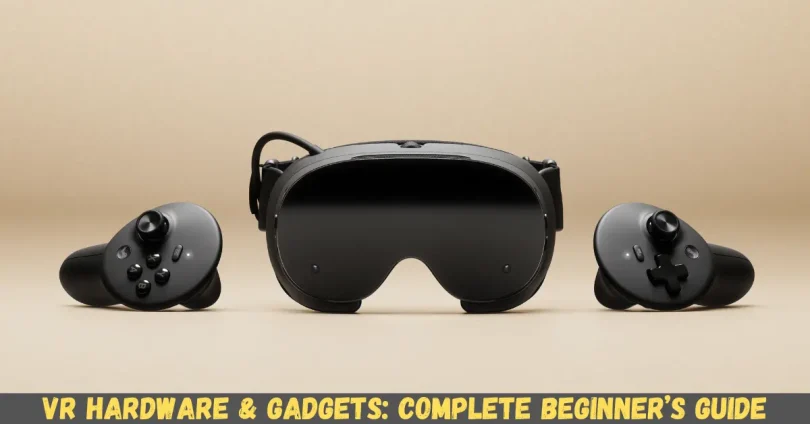
VR hardware & gadgets refer to the physical devices and tools that make virtual reality possible. They create immersive environments by combining visual, auditory, and motion-sensing technologies. At its core, VR hardware enables users to step into digital worlds and interact with them as if they were real.
The most common VR hardware includes:
- VR Headsets – Devices worn over the eyes to provide stereoscopic 3D visuals. Examples include Oculus Quest 3 and HTC Vive Pro.
- Motion Controllers – Handheld gadgets that track hand movement, allowing users to interact naturally within VR.
- Sensors and Cameras – Devices that track the user’s position and movements to maintain spatial accuracy.
- Haptic Feedback Devices – Gloves, vests, or suits that simulate touch, adding a sense of realism.
- VR-Ready PCs or Consoles – High-performance computers or gaming consoles capable of running VR applications smoothly.
VR hardware & gadgets work together to create an immersive experience, bridging the gap between the physical and digital worlds. These devices are designed to respond in real-time to user actions, offering an interactive and engaging environment.
Why is VR Hardware & Gadgets Important?
VR hardware & gadgets are essential because they form the backbone of all virtual reality experiences. Without these devices, VR content remains inaccessible or limited. Here’s why they matter:
- Immersive Experiences – They allow users to experience virtual worlds as if they were real.
- Interactive Learning – VR gadgets are increasingly used in education, training, and skill development.
- Enhanced Gaming – Gamers can engage with digital environments on a whole new level.
- Creative Expression – Artists, designers, and architects use VR for simulations and prototypes.
- Remote Collaboration – VR enables remote teams to meet and interact in shared virtual spaces.
In short, VR hardware & gadgets transform static digital content into interactive experiences, making technology more engaging and practical for multiple purposes.
Detailed Step-by-Step Guide to VR Hardware & Gadgets
Step 1: Choosing the Right VR Headset
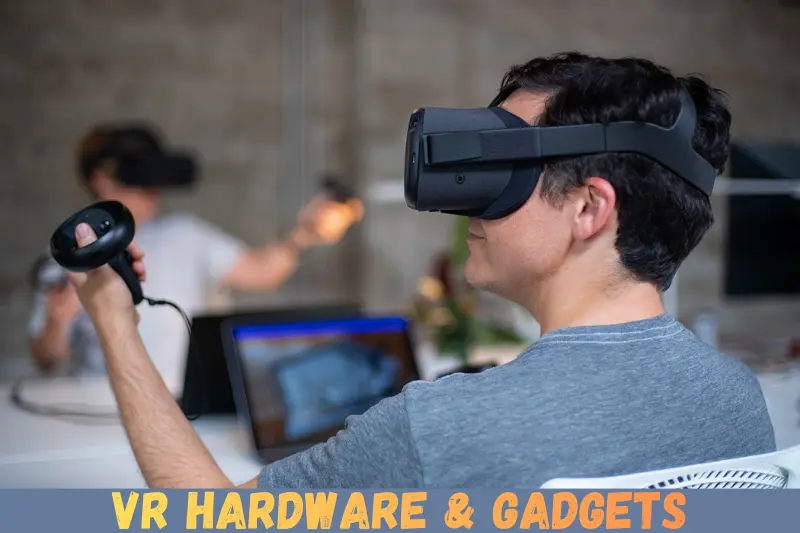
Selecting a headset is the first step in your VR journey. Consider the following factors:
- Type of Headset – Standalone (Oculus Quest), PC-powered (Valve Index), or console-based (PlayStation VR).
- Display Quality – Look for high resolution and refresh rates for smooth visuals.
- Comfort – Adjustable straps and lightweight design are important for long sessions.
- Tracking Capabilities – Inside-out tracking is easier to set up, while external sensors offer higher precision.
Step 2: Setting Up Motion Controllers
Motion controllers track your hands and provide input within VR. To set them up:
- Charge the controllers fully before use.
- Pair them with your VR headset following manufacturer instructions.
- Calibrate the sensors to ensure accurate motion tracking.
- Test simple gestures to get familiar with the controls.
Step 3: Installing Sensors and Cameras
Proper sensor placement is crucial for accurate tracking:
- Position sensors at opposite corners of your play area.
- Keep a clear line of sight between sensors and controllers.
- Adjust height to match standing or seated VR experiences.
- Regularly clean lenses and cameras to avoid interference.
Step 4: Using Haptic Feedback Devices
Haptic devices enhance immersion by simulating touch:
- Wear haptic gloves or vests snugly for accurate feedback.
- Configure vibration intensity in the VR software settings.
- Use them selectively in games or applications that support haptic feedback.
Step 5: Optimizing VR-Ready PC or Console
For PC or console-based VR:
- Ensure your system meets the recommended hardware specifications.
- Update graphics drivers and VR software regularly.
- Keep your play area clear of obstacles to avoid accidents.
- Use high-quality headphones for immersive audio.
Benefits of VR Hardware & Gadgets
- Immersive entertainment and gaming experiences.
- Improved learning and training outcomes.
- Creative design and simulation tools for professionals.
- Enhanced collaboration in virtual workplaces.
- Physical activity through interactive VR games.
- Exposure to new environments without traveling.
Disadvantages / Risks
- High initial investment for quality hardware.
- Motion sickness or eye strain for some users.
- Space requirements for safe movement.
- Hardware compatibility issues across devices.
- Limited battery life for standalone VR headsets.
- Software glitches or bugs can disrupt immersion.
Common Mistakes to Avoid
- Ignoring Comfort – A heavy or poorly fitted headset can cause fatigue.
- Skipping System Requirements Check – Using VR on incompatible PCs or consoles reduces performance.
- Neglecting Safety – Play areas must be free from obstacles to prevent accidents.
- Overlooking Updates – Outdated software can cause tracking errors or crashes.
- Using VR for Too Long – Extended sessions may cause motion sickness or eye strain.
- Underestimating Battery Life – Standalone headsets need regular charging to avoid interruptions.
FAQs About VR Hardware & Gadgets
1. What is the best VR headset for beginners?
For beginners, standalone headsets like Oculus Quest 3 are ideal because they are easy to set up and don’t require a PC.
2. Do I need a powerful PC for VR?
It depends. Standalone headsets do not require a PC, but PC-powered VR devices need high-end graphics cards and processors for smooth performance.
3. Can VR cause motion sickness?
Yes, some users experience motion sickness due to mismatched motion and visual cues. Short breaks and gradual usage can help.
4. Are VR gadgets suitable for kids?
Some VR devices are suitable for children, but it’s recommended to follow age restrictions and limit session duration.
5. How do motion controllers work?
Motion controllers track hand movement using sensors, gyroscopes, and infrared cameras, allowing natural interaction in VR environments.
6. What types of VR experiences are available?
VR offers gaming, training simulations, educational content, virtual tours, creative design tools, and social interactions.
7. How do I clean my VR headset?
Use a microfiber cloth for lenses, avoid liquids directly on the headset, and regularly sanitize the face cushion.
8. Can VR gadgets improve fitness?
Yes, VR games with motion tracking can offer physical exercise while making workouts more fun.
Expert Tips & Bonus Points
- Start Small – Begin with short VR sessions to avoid discomfort.
- Use High-Quality Headphones – Audio plays a crucial role in immersion.
- Customize Your Play Area – Keep at least 6×6 feet clear space for safety.
- Check Software Compatibility – Not all apps work with every headset.
- Invest in Accessories – Extra face cushions, controller grips, and cable management improve comfort.
- Stay Updated – Firmware and software updates often improve performance and add features.
- Join VR Communities – Online forums provide tips, troubleshooting, and game recommendations.
Conclusion
VR hardware & gadgets are transforming the way we experience digital content. From immersive gaming to practical training simulations, these devices open a world of possibilities. While the technology can seem complex at first, understanding the components—headsets, controllers, sensors, haptic devices, and VR-ready PCs—makes it much easier to start.
Beginners should focus on comfort, compatibility, and proper setup to avoid common mistakes. With careful planning and smart choices, VR can provide safe, engaging, and highly interactive experiences. As the technology evolves, VR hardware & gadgets will continue to become more accessible, offering even richer experiences for everyone.