
Introduction
VR simulations have transformed the way we interact with technology. Once a concept limited to science fiction, virtual reality (VR) has become a practical tool used in education, healthcare, gaming, and even professional training. The ability to create realistic, immersive environments offers users a chance to experience situations safely, without real-world consequences. Whether you are exploring a distant planet, practicing surgical procedures, or training for a complex machine operation, VR simulations provide a safe and engaging platform.
The concept may sound complex, but VR simulations are surprisingly accessible to beginners. With VR headsets becoming more affordable and software increasingly user-friendly, anyone can step into a virtual world. This guide will walk you through everything you need to know about VR simulations—from what they are and why they matter to detailed steps for getting started, their benefits, risks, and expert tips. By the end, you will have a clear understanding of how to use VR simulations effectively.
What is VR Simulations?
VR simulations are digital recreations of real or imagined environments that users can interact with through virtual reality technology. They combine computer-generated imagery (CGI), sensors, and input devices like VR headsets or controllers to create an immersive experience. Unlike traditional video games or 3D models, VR simulations allow users to feel as if they are actually inside the environment.
For example, a VR flight simulation allows a user to sit in a virtual cockpit, control the aircraft using realistic instruments, and experience conditions like turbulence or takeoffs. Similarly, VR surgical simulations let medical students practice complex procedures without risking patient safety. These simulations are not limited to one field; they can range from gaming and entertainment to professional training and education.
At the core, VR simulations rely on three main components:
- VR Headsets: Devices worn on the head to display 3D environments and track movements.
- Input Devices: Controllers, gloves, or sensors that allow interaction with the virtual world.
- Simulation Software: Programs that generate realistic environments and scenarios.
By combining these elements, VR simulations create highly interactive, engaging, and realistic experiences.
Why is VR Simulations Important?
VR simulations are more than just a new form of entertainment—they are a powerful tool for learning, training, and innovation. Here’s why they are important:
- Safe Learning Environment: They allow users to practice dangerous or complex tasks safely, such as firefighting, military operations, or medical procedures.
- Cost-Effective Training: VR reduces the need for expensive physical setups or materials, saving organizations significant resources.
- Enhanced Engagement: Immersive experiences increase focus and retention compared to traditional learning methods.
- Accessibility: VR can provide access to experiences that are otherwise impossible, such as traveling to space or exploring inaccessible locations.
- Innovation in Design: Architects, engineers, and designers use VR to visualize projects before implementation, minimizing errors and improving efficiency.
The importance of VR simulations continues to grow as technology improves. With the rise of 5G, advanced VR headsets, and AI integration, the potential applications are almost limitless.
Detailed Step-by-Step Guide
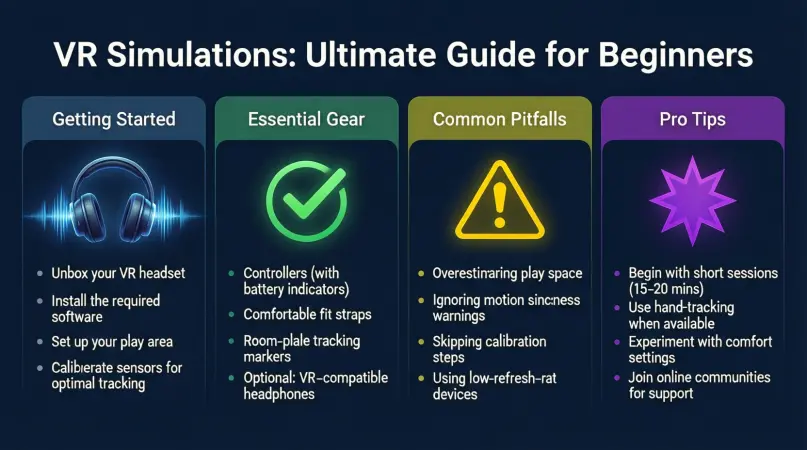
Getting started with VR simulations can seem intimidating, but with a clear process, anyone can dive into the virtual world. Below is a step-by-step guide for beginners.
Step 1: Choose the Right VR Hardware
Selecting the right hardware is crucial for an optimal VR experience. Options include:
- Standalone Headsets: Devices like Oculus Quest 3 that don’t require a PC or console.
- PC-Connected Headsets: High-end devices such as HTC Vive Pro or Valve Index that deliver more powerful graphics and detailed simulations.
- Console-Based Headsets: For PlayStation users, PS VR2 offers gaming-focused VR experiences.
Consider factors such as resolution, refresh rate, comfort, and tracking capabilities when choosing a headset.
Step 2: Set Up the VR Environment
Once you have the headset, create a safe physical space for VR. Ensure there’s enough room to move freely and remove obstacles to prevent accidents. Most VR systems include a boundary setup process to alert users when they approach walls or furniture.
Step 3: Install VR Simulation Software
Next, select software or applications suitable for your interests. Popular VR simulation categories include:
- Gaming Simulations: Explore worlds and challenges in VR games like Beat Saber or Half-Life: Alyx.
- Educational Simulations: Platforms like ENGAGE or Labster provide immersive learning environments.
- Professional Training Simulations: Tools like VR Surgery Simulators or Pilot Training VR help professionals practice skills.
Install the software and follow the on-screen instructions to calibrate the system.
Step 4: Learn Basic Controls
Most VR simulations use controllers with buttons, triggers, or motion tracking. Beginners should spend time learning basic movements:
- Moving forward, backward, and sideways
- Interacting with objects
- Using menus and tools
Practicing these actions in a beginner-friendly simulation will help build confidence.
Step 5: Customize the Experience
Many VR simulations allow customization, such as adjusting graphics settings, movement speed, and audio levels. Tailoring the experience improves comfort and immersion, especially for longer sessions.
Step 6: Engage and Explore
Once setup is complete, start exploring the VR simulation. Focus on:
- Experimenting with interactions
- Observing realistic responses within the environment
- Trying multiple scenarios to gain experience
Step 7: Review and Improve
After using the simulation, review your experience. Consider what worked well and what could be improved, such as physical comfort, ease of navigation, or understanding of tasks.
Benefits of VR Simulations
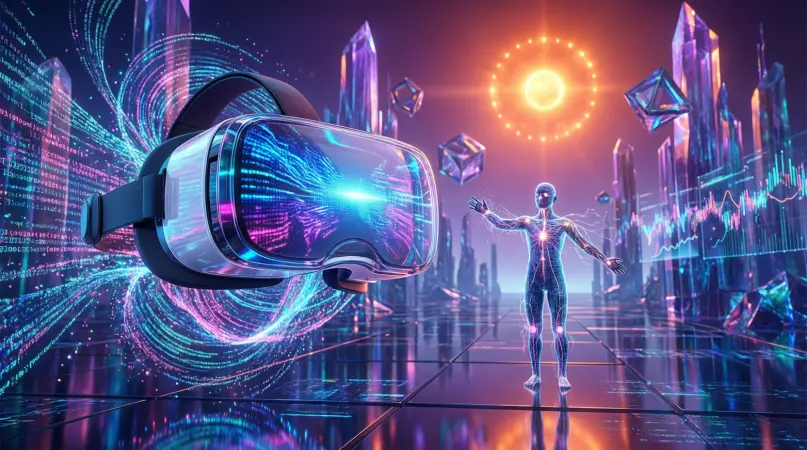
VR simulations offer multiple advantages across different areas. Some key benefits include:
- Enhanced Learning and Retention: Immersive environments improve memory retention compared to textbooks or videos.
- Hands-On Practice: Users can perform tasks repeatedly in a safe virtual setting.
- Reduced Risk: Dangerous activities like firefighting or military exercises can be simulated without real-world hazards.
- Cost Savings: Eliminates the need for expensive physical setups, equipment, or materials.
- Increased Engagement: Interactive simulations keep users focused and motivated.
- Flexibility: VR simulations can be accessed from home or training centers, making learning more convenient.
- Accessibility: People with physical limitations can participate in activities that would otherwise be impossible.
Disadvantages / Risks
While VR simulations are beneficial, they also come with some drawbacks and risks:
- Motion Sickness: Some users experience nausea or dizziness, especially during prolonged sessions.
- High Initial Costs: Quality VR headsets and software can be expensive.
- Physical Fatigue: Extended use may cause eye strain, neck strain, or general fatigue.
- Limited Real-World Feedback: VR cannot fully replicate the tactile sensations or environmental variables of reality.
- Addiction Risk: Engaging VR games or simulations can lead to excessive screen time if not managed.
- Technical Issues: Hardware malfunctions, software bugs, or connectivity problems may disrupt experiences.
Understanding these risks ensures users approach VR simulations safely and responsibly.
Common Mistakes to Avoid
Many beginners make mistakes that reduce the effectiveness of VR simulations. Here’s what to avoid:
- Skipping Calibration: Not setting up sensors or boundaries properly can cause accidents.
- Ignoring Safety Precautions: Failing to clear the play area increases the risk of injury.
- Overlooking Comfort: Poor headset adjustments can lead to headaches or eye strain.
- Rushing the Learning Curve: Jumping into complex simulations too soon can be frustrating.
- Neglecting Breaks: Extended VR use without breaks can affect health.
- Using Low-Quality Software: Poorly designed simulations reduce immersion and learning effectiveness.
- Forgetting Updates: VR software and hardware updates often include important improvements and bug fixes.
By avoiding these mistakes, beginners can enjoy a smoother and safer VR simulation experience.
FAQs
1. Are VR simulations suitable for children?
Yes, but with caution. Age-appropriate content and time limits should be followed. Many headsets recommend use for children 12 and older.
2. Do I need a powerful computer for VR simulations?
It depends on the headset. Standalone VR headsets do not require a computer, while high-end PC-connected headsets need strong graphics and processing power.
3. Can VR simulations replace real-world training?
VR simulations are excellent for practice but cannot fully replace hands-on experience. They are best used as a supplementary tool.
4. How long should a VR session last?
For beginners, sessions of 20–30 minutes are ideal. Gradually increase duration as comfort improves.
5. Can VR simulations cause motion sickness?
Yes, especially if frame rates are low or movement in the simulation is inconsistent with physical motion. Taking breaks and adjusting settings helps reduce discomfort.
6. Are VR simulations expensive?
Costs vary. Entry-level headsets are affordable, but high-quality VR setups for professional use can be costly. Free or low-cost software is often available for beginners.
7. Do VR simulations work for professional training?
Absolutely. Industries like healthcare, aviation, and manufacturing use VR simulations to improve skills and safety without real-world risks.
8. Can I use VR simulations without controllers?
Some simulations allow hand tracking or gaze-based interaction, but controllers generally provide better precision and control.
Expert Tips & Bonus Points
- Start Simple: Begin with beginner-friendly simulations before advancing to complex scenarios.
- Adjust Graphics Settings: Lowering graphics quality can improve performance and reduce motion sickness.
- Take Regular Breaks: Every 20–30 minutes, remove the headset to rest your eyes and body.
- Use High-Quality Audio: Immersive sound enhances realism and engagement.
- Stay Hydrated and Comfortable: VR can be physically demanding, so maintain comfort and hydration.
- Experiment with Different Simulations: Trying multiple types of VR experiences broadens skills and enjoyment.
- Keep Hardware Updated: Firmware updates improve performance and add new features.
- Join VR Communities: Learning from experienced users can provide tips, tricks, and support.
Conclusion
VR simulations are transforming the way we learn, play, and train. By combining immersive technology, realistic scenarios, and interactive experiences, VR enables users to explore new worlds, practice complex skills, and engage in activities safely. Whether for education, professional training, or entertainment, VR simulations offer limitless opportunities for growth and innovation.
For beginners, the key is to start slowly, understand the hardware, practice safe usage, and explore different applications. While there are some risks and limitations, careful use ensures a safe, engaging, and highly rewarding experience.